The Series: Signed, Sealed, Certified (Part One: What is a Certificate, Really?)

By Nathaniel Edwards
The short answer
For the most part, folks working in Information Technology have seen, heard of, or glimpsed a certificate. Many folks have dealt with issues surrounding certificates. But what is a certificate, what is it doing behind the curtain, and what makes up a certificate?
Part One: What is a Certificate, Really?
This is going to be the first post of a 10-part series (maybe more) where I break down certificates: what they are, what they do, how they're used, and where trouble might be "creepin' 'round the bend." We're going at this with baby steps first, with a gradual crescendo into the heavier-ish items.
For the most part, folks working in Information Technology have seen, heard of, or glimpsed a certificate. Many folks have dealt with issues surrounding certificates. But what is a certificate, what is it doing behind the curtain, and what makes up a certificate?
Think of the Wonderball! The 90's chocolate candy sensation/abomination with "something" buried inside. We all wanted one, we all knew the jingle. We're about to crack it open.
What is a Digital Certificate?
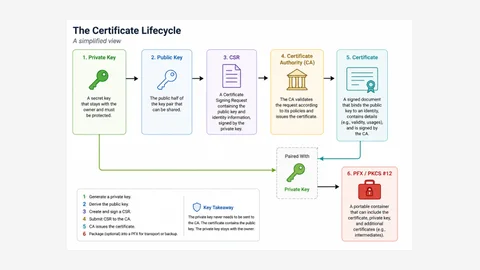
At the fundamental level, a certificate is an electronic identity document. Think of a passport or a driver's license. Some authority checked who you were, printed it on a document, and signed that document in a way that's hard to forge. A certificate provides information about a person, computer, server, website, app, or organization. It also contains a public key and a digital signature.
It connects an identity to a public key and packages the information into a digitally signed document.
There are three important pieces (as a takeaway):
\* Identity
\* Public Key
\* Digital Signature
What is a Certificate Doing?
A certificate helps another device, app, system, etc. answer a few questions such as:
\* Who/What am I communicating with
\* What public key belongs to that identity?
\* Who issued it?
\* Did someone mess with the certificate?
\* Is the certificate valid?
\* What can this certificate be used for?
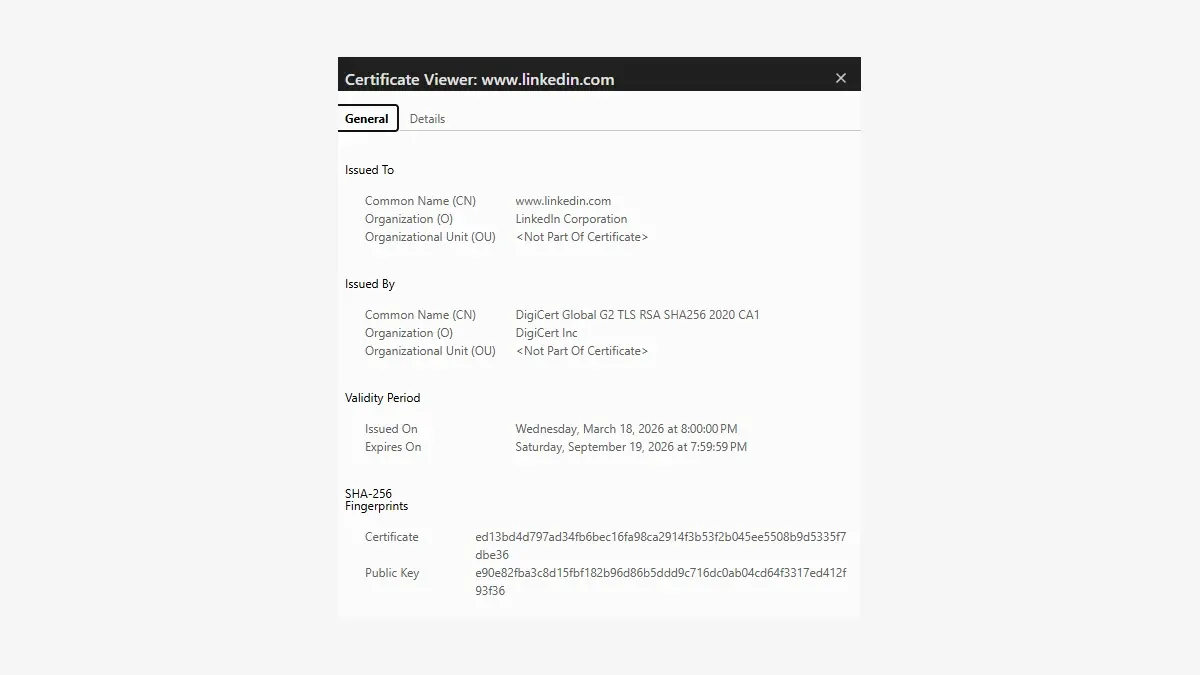
We normally see certificates and their details in the "padlock" to the left of an address in a web browser.

And can be used to identify (see above screenshot), websites, VPN gateways, wireless authentication servers (NPS - example), workstations, users, apps, etc.
The exact role of a certificate varies, but again, the fundamental concept remains the same.
A certificate associates an identity with cryptographic information that another system can evaluate.
A certificate is NOT encryption by itself. That is a good thing to remember. It is also NOT the private key. It is also - and this is a big one - NOT automatic proof that something should be trusted.
Trust - comes later, which is a separate process. Stick around and we'll dive into it some more.
What is inside of a Certificate?
Open a certificate and you will find a collection of fields and extensions. Some certificates contain more information than others, but the following are some of the more common/major components.
Subject
The subject defines/identifies who or what the certificate was issued to. The subject will probably be something like a website, server, workstation, user, etc. Common stuff.
It [the subject] answers a simple question: Who or what is the certificate about?
For a computer certificate, the subject identifies the device. For a user certificate, it identifies the user. For a website certificate... well, you can probably see where this is going. HOWEVER, for website certificates, we're going to look at the Subject Alternative Name...
Subject Alternative Name
The Subject Alternative Name - SAN for short - lists the names the certificate actually covers. And for anything TLS, this is not a supplement to the Subject. It is the identity.
Disclaimer/Segway(yes, I know it's spelled segue): Scootin' along, the CN (Common Name) is decorative now. RFC 2818 (ye old Y2K publication) deprecated it for name matching. Between 2016 and 2020 the major browsers stopped honoring it entirely. It still exists, but no one seems to want to play with it anymore.
Shameless plug here, but I'll use my employer as an example. The SAN for vizius.com consists of:

So, we see the SAN details...that's cool. Yeah. Cool story bro. But what does this mean?
You navigate to vizius.com. The entity evaluating the certificate needs to determine whether or not the name is covered by the certificate. If the certificate only covers viziu[.]com (please note the missing "s", that's the failure here) then you're probably going to see a certificate name mismatch warning when you attempt to access the site.
Issuer
The Issuer identifies the entity that issued and digitally signed the certificate. In many cases, the issuer is a Certificate Authority (CA for short) which is typically a public CA, an internal enterprise CA, a sub CA, or in the case of a self-signed certificate, the same system represented by the certificate. (We'll also talk about these later. See how I keep leaving breadcrumbs?)
Recap: Subject = who is the certificate about. Issuer = entity that signed the certificate.
Serial Number
The Serial Number (SN for short) is a unique identifier assigned to the certificate by its issuer. It helps differentiate certificates.
A server, for example, will receive a myriad of certificates over its lifecycle. These certificates may contain the same name and serve the same purpose, but each will, and should, have its own serial number. Serial Numbers are useful for tracking, auditing, renewing, investigating, and revoking certificates.
Validity Period
Certificates - while we wish, wish, wish, in many cases that they would last forever, they don't. They are only issued for a limited period of time. This time period of validity is identified using two values:
\* Not Before
\* Not After
The certificate shouldn't be accepted before the Not Before date, and after the Not After date, the certificate is considered "expired."
Healthy services (RADIUS, NPS, VPN tunnels) can fail suddenly when a certificate reaches the end of its validity period.
Public Key
A certificate contains a public key associated with the subject.
Public Keys are designed to be shared. These Public Keys can be used to verify digital signatures, authenticate identities, and protect certain information types. There is an associated private key, and it is not normally contained in the public certificate. The private key needs to be protected by the certificate owner. We'll cover more on this later. (Another one. Hansel and Gretel would be proud.)
Digital Signature
The Certificate's issuer digitally signs the certificate. This signature helps to determine whether the certificate was signed by the listed issuer and/or whether or not the certificate has been modified since it was issued. If someone alters the aforementioned components (and more!) the signature should no longer validate correctly. In essence the signature helps protect the integrity of the certificate and provides evidence of where it came from.
Homage back to the title of this series: SIGNED.
Key Usage
The Key Usage field describes the cryptographic operations the certificate's key may be used to perform. This can vary from functions such as creating signatures, establishing keys, encrypting keys, and signing other certificates.
Biggest thing to remember here, not every certificate should be allowed to perform every cryptographic function. Think PoLP. Key Usage establishes boundaries.
Extended Key Usage
Extended Key Usage (EKU for short) provides specific information about the certificate's purpose. You'll probably see usages for Server Auth, Client Auth, Code Signing, Secure Email, and Smart Card Logon, among others.
The reason? A certificate may be unexpired, properly signed, and issued by a valid/recognized CA, but still be rejected because it was created for the wrong purpose. The EKU is asking all the right question(s): What are you doing? What job are you performing?
It's 4 p.m. on a Friday. You've just finished standing up EAP-TLS. You've cut the wifi over so the dust can settle over the weekend. The NPS server has a certificate. It's valid, it's in date, it chains cleanly to your enterprise CA, and the CA is trusted everywhere it needs to be. But, you're running into client auth issues. The event log is not especially interested in helping you. The certificate was issued with Client Authentication in its EKU. NPS wants Server Authentication. Nothing about the certificate is broken. It's just holding the wrong job title, and every check that isn't the EKU check passes with flying colors.
What does a Certificate tell us?
A certificate provides representation, issuer credence, validity details, public key information, certificate intent, and integrity checks.
On the inverse, what does a certificate omit?
Certificates do not automatically ensure trust, subject security and safety, non-compromised private key(s), revocation status, appropriate use, etc.
These details require additional checks such as trust stores, cert chains, app rules, revocation information, identity matching, and private key protection.
Once more, for the road:
A digital certificate is a signed identity document that connects a subject to a public key, identifies who issued it, describes how it may be used, and defines how long it is valid.