Protecting infrastructure with always-on VPN

By Max DingesPrincipal Engineer
The short answer
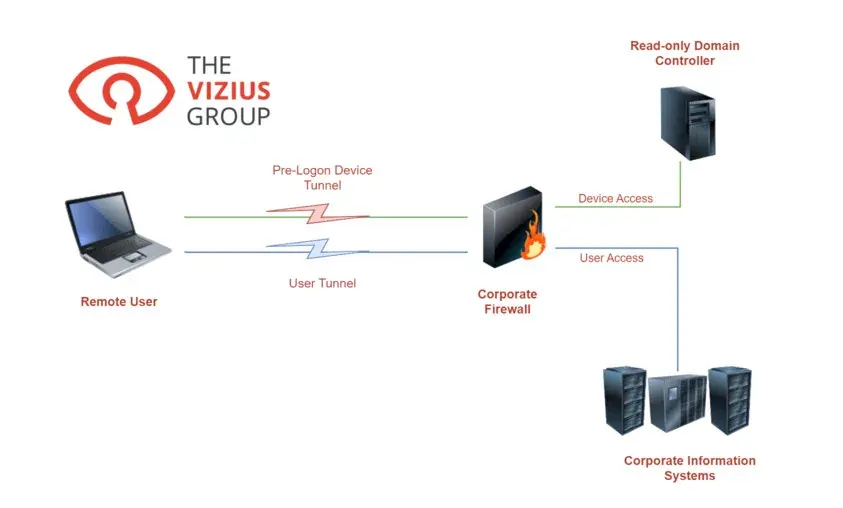
An always-on VPN connects a device before anyone logs on, using a certificate-protected device tunnel, then brings up a user tunnel with multi-factor authentication as soon as the user signs in. That gives you three wins: stronger device authentication, stronger user authentication and better visibility of traffic.
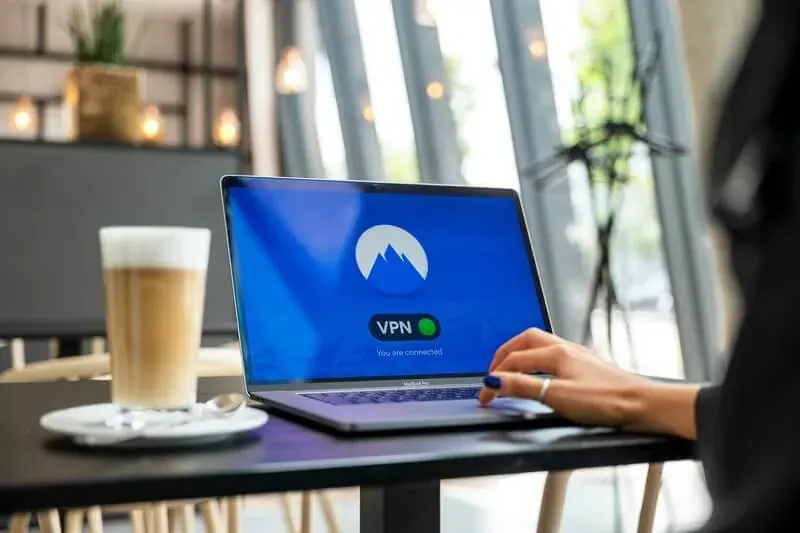
With the advent of work from home, distributed workforce, and flexible work locations, the importance of protecting your infrastructure is greater now than ever before. Part of protecting infrastructure is protecting sign-on and this can be accomplished with Multi-Factor Authentication.
While there are many solutions offered today to remotely manage corporate assets there are few that are entirely holistic. Take into account that replacing existing infrastructure, migrating to a new solution, or the cost of these solutions might be too onerous for your organization; what option is there to protect assets as if they were on-premise? An Always-On VPN provides this functionality, and the deployment can be realized in weeks instead of months.
The question “What is an Always-On VPN?” may seem to have an obvious answer. However, like many technical terms, this one has also been hijacked by marketing. To define terms, we’re speaking here of a method of:
- Protecting the device in the pre-logon environment (the time between power-on and logon where no user is logged-in).
- A tunnel that connects immediately after the user logs onto the device.
- Denying user-control of the VPN tunnel (including the ability to split-tunnel resources).
We will discuss how starting the machine with VPN already connected to the environment can make a strategic difference in your company’s security posture. There are three reasons why this can help improve your security posture: device authentication, improved user authentication, and traffic visibility.
Improved device authentication
At initial power-on there’s no user login event or credentials that should be accessible to the system at this stage, a device tunnel is created where the device joins a VPN protected by a certificate and key-pair from your private-key infrastructure. This means this tunnel is only protected by a single factor (anyone with the certificate and key-pair can join this VPN). The device tunnel should only allow the computer to communicate with resources like Read-only Domain Controllers (RoDC), known and trusted endpoints for updates/patches (either internally or on the internet), SIEM collectors (like Sumo Logic and Splunk), and other resources used for device control/management (like Kaseya, SolarWinds N-Central, etc.).
Once rolled out, this process can be folded into your device provisioning mechanisms. By doing this, you are once again moving toward the security maxim of ‘know what is on your network,’ but applying it to the cloud.
Improved user authentication
Now that we have established that the device itself is allowed into our environment, we’ll turn our attention to the user tunnel. I firmly believe that all user access should be done through multi-factor authentication (see my MFA table below and pick two mechanisms — the most common in enterprises are Password and Certificate Key Pair). With two factors selected, the user VPN will be setup to require both factors to access internal/protected resources. Most VPN providers support all the combinations of something you know and something you are. But the best combinations work when the user doesn’t have to perform extra steps. For example, GlobalProtect from Palo Alto Networks is capable of creating the device tunnel using a certificate in the device’s Computer Certificate Store and upon login will utilize the login process to create the user-tunnel without any additional prompts to the user. Add in the requirement for a certificate key-pair from your internal certificate authority and you’ve achieved the goal of protecting your infrastructure with Always-On VPN and MFA.
This may seem like overkill at first glance, kind of like an ‘encryption will solve all of your problems’ mindset. However, with the rise of account takeover and MFA bypass (which, by some metrics, account for 83% of account takeovers this year), we would argue that this is one of the few ways companies can legitimately protect themselves from this threat.
| Authentication mechanism | Factor type |
|---|---|
| Password | Something you know |
| PIN | Something you know |
| Authenticator app | Something you have |
| SMS | Something you have |
| Hardware token (FIDO/U2F or certificate key-pair) | Something you have |
| Certificate key-pair | Something you have |
| Finger or palm scan | Something you are |
| Facial recognition | Something you are |
Improved traffic visibility
After the user is on the VPN there are ways to ensure the device is fully protected, manageable, and compliant within your infrastructure. Implementing a solution like this provides several avenues for additional visibility and control. For instance, you could determine, by policy:
- Whether or not a user is able to disconnect from the VPN.
- Whether all traffic should go through the user tunnel or if you want to use utilizing split-tunneling.
- To analyze all traffic via a proxy or next-gen firewall
These questions will likely have different answers based on the requirements of each business.
Ready to enhance your remote workforce security effortlessly? Partner with Vizius Group’s cybersecurity experts for a tailored Always-On VPN solution that protects your infrastructure seamlessly. Contact us today to discuss your security needs and get started on securing your assets with confidence.